

Run promotions and coupons on your terms.
Create coupon codes customers enter at checkout, or discounts that apply automatically, each with the conditions you choose, including first-order promotions.
Promotions and coupons
What you can do
Coupons and automatic discounts
Create a coupon customers redeem at checkout, or a discount that applies automatically.
Percentage or fixed amount
Set a discount as a percentage of the order or as a fixed amount.
Conditions you control
Limit an offer by product or category, schedule, delivery zone, order type, payment method, minimum purchase, and usage per customer or in total.
First-order promotions
Welcome new customers with a promotion on their first order.
Customer checkout
Both kinds of discount show up the same way: as savings.
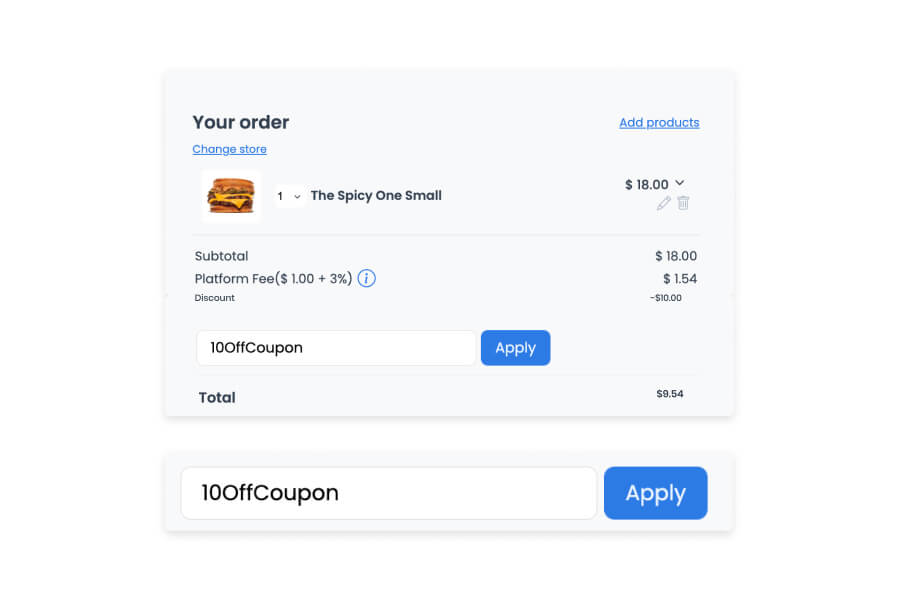
An automatic discount is applied to the order without any action from the customer. A coupon needs a code, entered in its own field and confirmed with Apply. Either way, the customer sees the discount itemized next to the subtotal, fees, and total before they pay.
- Automatic discounts appear as a line item on the order with no code required
- Coupon codes are entered in a dedicated field and confirmed with Apply
- The discount is itemized separately from the subtotal, service fee, and platform fee
- The customer sees the final total update immediately once the discount applies
Dashboard, Marketing
Set the conditions before the offer goes live.
A coupon or an automatic discount is only as good as the conditions around it. Set the discount as a percentage or a fixed amount, then limit it to the products, schedule, zone, order type, and customers it should reach.
- Set the discount as a percentage of the order or as a fixed amount
- Limit it by product or category, schedule, delivery zone, order type, or payment method
- Require a minimum purchase, or cap how many times it can be used per customer or in total
- Welcome new customers with a promotion limited to their first order
Good to know
- Offers apply per store. Plan the conditions before a campaign goes live.
Related
See all featuresSee how it fits your operation.
Start a free trial, or walk through your setup with the Ordering.co team.