

Let customers in the way they prefer.
Customers sign up with email or phone, sign in with an existing Facebook or Google account, or skip an account entirely with guest checkout. Sign-in stays protected, and a forgotten password is never a dead end.
Account login and guest checkout
What you can do
Sign up with email or phone
Customers create an account with a name, an email address or phone number, and a password, and agree to your terms before their first order.
Sign in with a one-time code
Customers can sign in with a one-time code sent to their email or phone, with no password to remember, and the code adds a second check on who is signing in.
Facebook and Google sign-in
Customers sign in with an existing Facebook or Google account in one tap instead of filling out a registration form. Apple sign-in works the same way.
Guest checkout
Customers place an order without creating an account, entering only the delivery details the order needs.
A time limit on guest access
A setting controls how many days a guest's order access stays valid before checkout asks for an account.
Forgot password reset
Customers reset a forgotten password with a link or code sent by email or SMS.
Protected sign-in
reCAPTCHA protects signup and login from bots, and signups can require email and phone verification.
Website and customer app
Sign up or sign in in a few taps
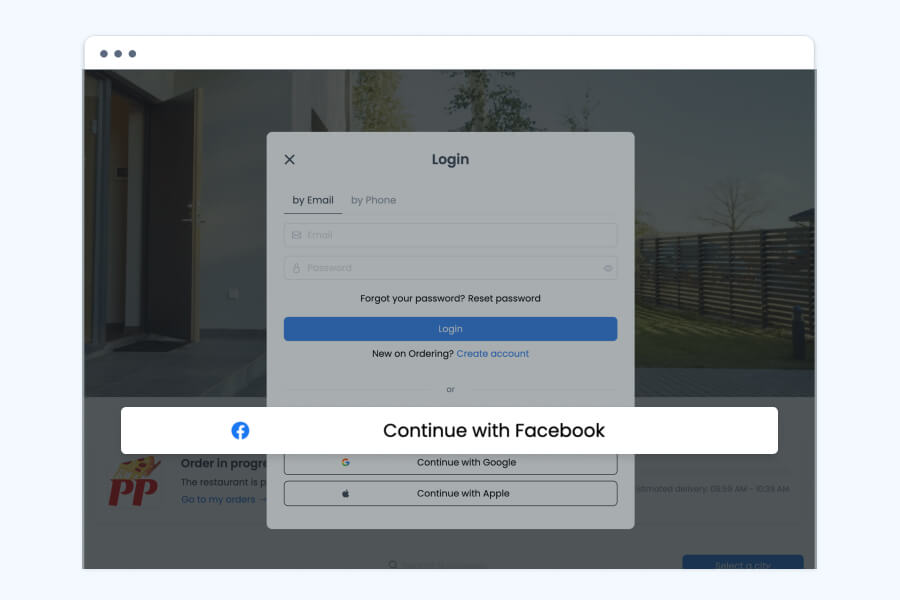
The login window offers email or phone sign-in alongside social options, so customers use whichever is fastest for them.
- Sign in by email or by phone, with a password
- Continue with Facebook or Google using an existing account, no new password to remember
- A Forgot your password link sits next to the login button
- A Create account link starts the sign-up flow for customers who are new
Website and customer app
Creating an account takes a few steps
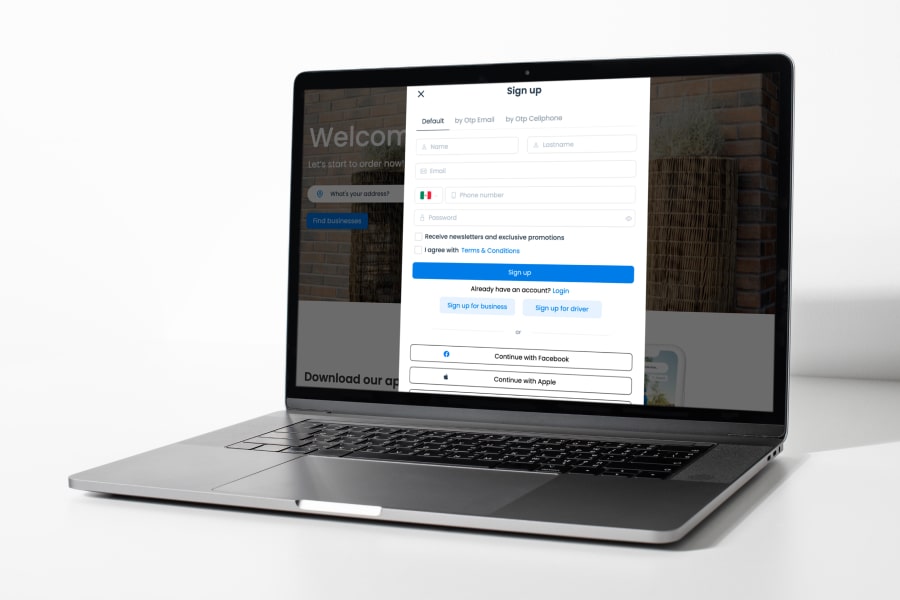
Sign-up asks for only what an order needs: a name, a way to reach the customer, and a password, or a social account instead.
- Enter a first and last name, an email address, and a phone number
- Set a password, or continue with Facebook or Apple from the same screen
- An optional checkbox opts in to newsletters and promotions
- Agree to the terms and conditions before the account is created
- Separate sign-up links exist for a business or a driver, kept apart from the customer flow
Website and customer app
Order without creating an account
Guest checkout keeps a first order fast: customers enter delivery details and pay, with no registration step in the way.
- Place an order by entering delivery details only, without signing up
- Removes the registration step between browsing and checkout
- A setting sets the maximum number of days a guest's order access stays valid before an account is required
Sign-in stays protected
A customer's sign-in is protected the same way whether they use a password or a social account.
- reCAPTCHA protects signup and login from automated bot attempts
- Signups can require email and phone verification
- A forgotten password resets through a link or a code sent by email or SMS
How it works
From sign-up to the first order.
- 01Start the sign-up
Open Sign up on your website or app.
- 02Enter the details
Provide a name, an email or phone number, and a password, or continue with Facebook, Google, or Apple.
- 03Agree to the terms
Review and accept the terms and conditions.
- 04Log in and order
The account is created, so the customer can log in and place the first order.
Good to know
- Which social sign-in options appear depends on which providers you enable in your settings.
Related
See all featuresSee how it fits your operation.
Start a free trial, or walk through your setup with the Ordering.co team.