

01
Performance Insights
Provides in-depth insights into driver performance, offering a comprehensive view of their activities, behaviors, and accomplishments.
Delivery reporting
Collect the data behind daily delivery operations, compare logistics across stores, and analyze how your delivery business is performing.
Available metrics, time ranges, and export options depend on the plan and configuration enabled for your account. For current plan availability, review Ordering.co pricing.

Highlights of Driver Reports
Use performance insights, tracking, metrics, productivity, and compliance signals to define the reporting view your team needs.
Provides in-depth insights into driver performance, offering a comprehensive view of their activities, behaviors, and accomplishments.
It allows real-time tracking of drivers' activities, including their routes, stops, and driving habits.

You can customize the metrics and key performance indicators (KPIs) tracked in the reports to align with your business goals and priorities.
With data on driver efficiency, you can look at routes, idle time, and overall productivity to find opportunities for cost savings and better customer service.
Review each driver against your own delivery-time expectations, and follow up on the issues or complaints their reports surface.
The reporting view
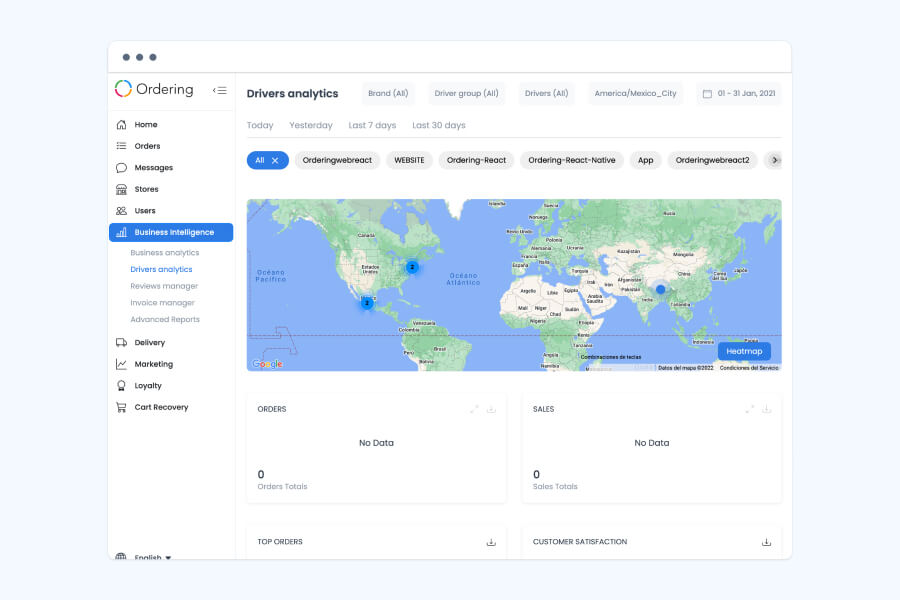
Filter by brand, driver group, driver, or country, set a date range or pick a quick preset, and narrow by channel — then read Orders, Sales, Top Orders, and Customer Satisfaction on a map that can switch to a heat-map view.

Built for data-driven teams
Use Drivers Reports to decide, with data, which drivers are right for which tasks, and refine delivery operations from there.
Talk to Ordering.coTell us which metrics matter, how often you need them, and who should see the results.