

What your $4,999 gets you
Pay once. Launch your marketplace. Keep it current.
One platform, every screen
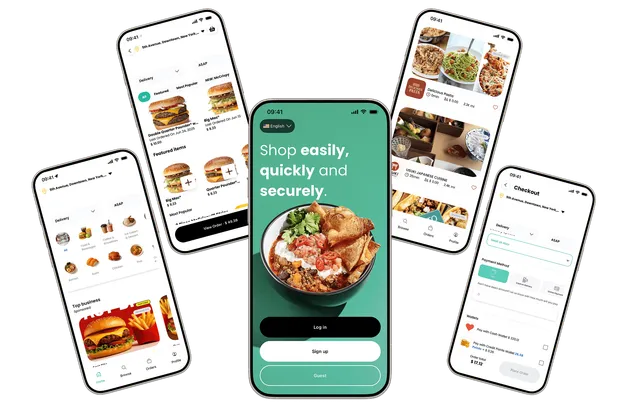
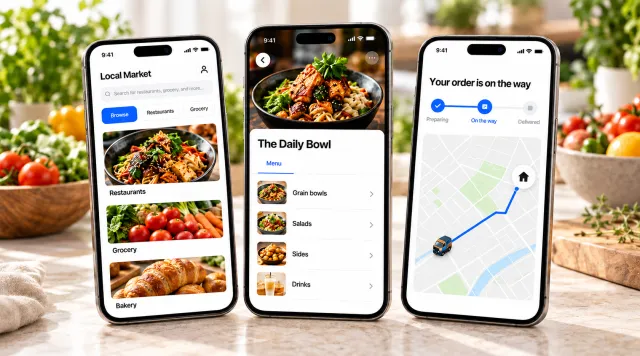
Your customers order, your stores prepare and your drivers deliver, on apps, kiosks, calls and chats that carry your brand.
Everything in the plan
From checkout to doorstep, plus the tools to grow and run your marketplace. Managed infrastructure, standard support, and platform updates are included.
Ordering Suite
Let shoppers browse multiple merchants on one website or app and check out in one cart.
- Marketplace websiteLaunch a storefront for multiple vendors.
- Marketplace appReach customers on iOS and Android.
- Store websitesGive merchants a site for direct orders.
- Restaurant appsPublish a branded app for a merchant.
- Ordering KioskTake self-service orders on-site.
- Ordering Call CenterTake assisted orders over the phone.
- Web AI OrderingTake orders in a website chat.
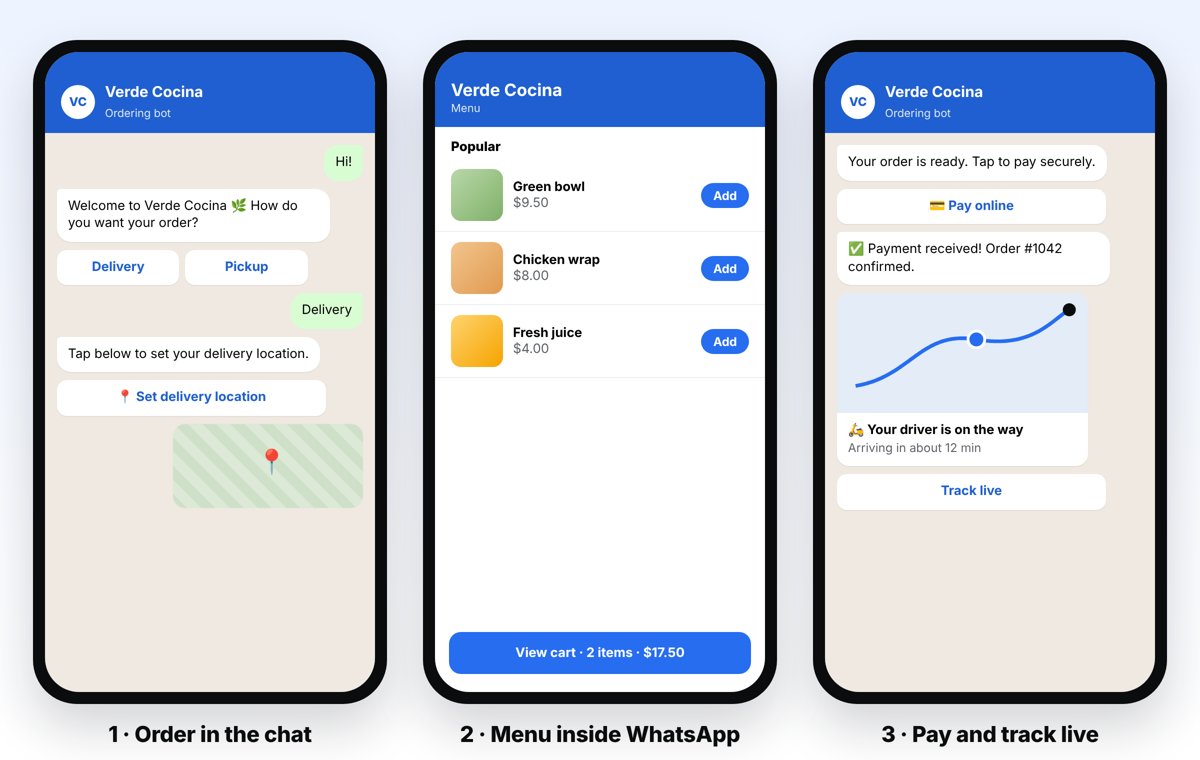
- WhatsApp AI OrderingTake orders in supported chats.
Delivery Suite
See who can take the next delivery, assign the order, and follow it to the customer.
- Ordering DeliveryConfigure your delivery operation.
- Delivery DashboardSee orders, drivers, and a live map.
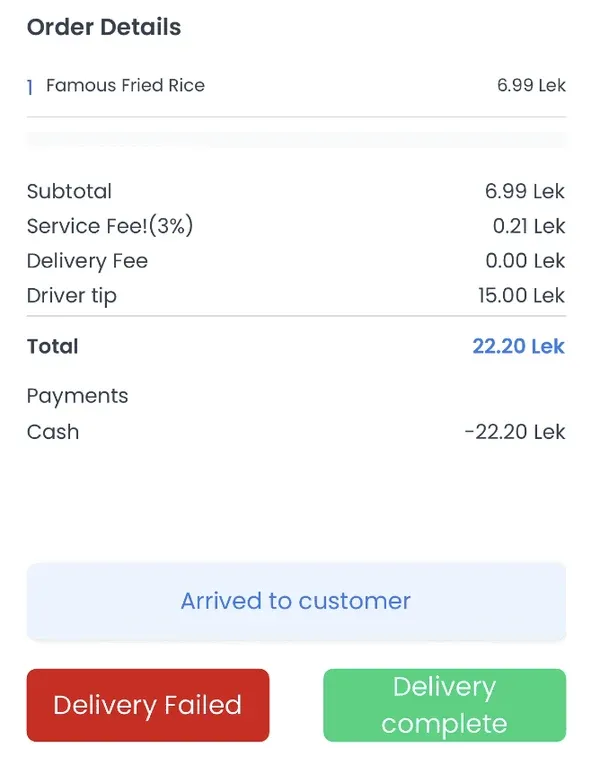
- Driver AppSend pickup and drop-off details to drivers.
- Courier integrationsDispatch to supported delivery networks.
Marketing & Loyalty Suite
Turn a first order into a second with rewards, referrals, and timely reminders.
- PromotionsCreate coupons and targeted offers.
- Customer campaignsCreate campaigns for past customers.
- Loyalty & walletsReward the next order with points or cashback.
- Gift cardsSell and redeem gift cards.
Run Your Marketplace
Manage merchants and daily operations from one place.
- Operations DashboardSee businesses, customers, and orders.
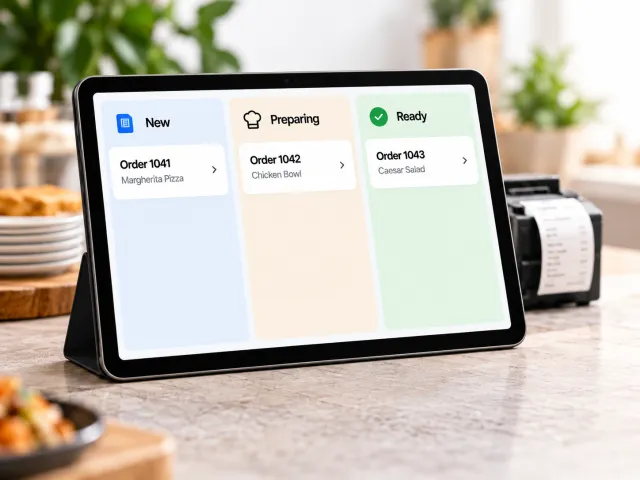
- Ordering MerchantHandle orders on a phone or tablet.
- Menus & catalogManage products, modifiers, and stock.
- Analytics & reportsReview sales and export data.
Connect and Extend
Integrate the systems you use and build on the platform.
- Ordering ConnectManage connections from one place.
- Payments & Stripe ConnectAccept online payments.
- POS & marketplacesConnect supported order channels.
- API & MCPBuild and connect compatible tools.
- Webhooks & pluginsSend events and automate workflows.
- Frontend source codeCustomize included web and app frontends.
All 194 features of the platform
Search the full Ordering.co catalog, or browse it by area.
- Branded ordering websiteAn ordering website with your brand on your own domain.
- Branded customer appsiOS and Android ordering apps with your brand, published to your developer accounts.
- Progressive web appCustomers add your ordering site to their home screen for quick reordering.
- Self-ordering kioskCustomers order and pay from tablets or large screens in your store.
- Call center orderingAgents find customers by phone number, take orders, and reorder from one screen.
- Omnichannel orderingTake orders on the web, native apps, WhatsApp, AI ordering, kiosks, call center, and supported custom frontends, all in one order flow.
- AI ordering on the webCustomers place orders through a conversation inside your online ordering experience.
- WhatsApp AI orderingTake orders through WhatsApp conversations with your catalog, stores, and fulfillment rules.
- QR code orderingCustomers scan a QR code to order from the table, counter, or curbside.
- Order typesDelivery, pickup, dine in, curbside, and drive thru, configured per store.
- ASAP and scheduled ordersCustomers order for as soon as possible or for a specific date and time.
- Catering ordersTake large and planned orders with catering workflows.
- Table reservationsCustomers book a table, and the reservation reaches the store team.
- Appointments and servicesSell services that customers book for a time slot.
- School orderingParents order school meals for each student, with menus filtered by allergies and dietary tags.
- B2B orderingSell wholesale and direct to consumers from one dashboard and storefront.
- Website ordering widgetsAdd ordering to an existing website with embeddable widgets.
- Sell on social mediaShare ordering links on Facebook, Instagram, TikTok, and other social channels.
- Ordering from GoogleConnect your Google Business Profile so customers can start an order from search.
- Customer accountsEach customer keeps an account with saved addresses, cards, and order history.
- Login optionsSign in with email or phone and password, or a one-time code by email or SMS.
- Social loginCustomers sign up and log in with Facebook, Google, or Apple.
- Personalized home pageA home page with banners, ongoing orders, and the stores that serve the customer’s address.
- Search and filtersSearch and browse by product, store, and category, with filters that include price.
- Direct store linksShare a link that opens a specific store page.
- FavoritesCustomers save favorite orders, products, and stores.
- Quick reorderCustomers repeat a previous order in a few taps from their order history.
- Personalized recommendationsSuggest items based on what each customer ordered before.
- Multi-language orderingTranslate your platform, stores, and products into several languages.
- Contactless handoffOffer contactless drop-off and curbside pickup.
- Live order trackingCustomers follow the order status and the driver’s location in real time.
- Shareable order confirmationShare an order confirmation link with guests.
- Help sectionA built-in guide that helps customers use your ordering channels.
- WhatsApp ordering botA guided bot takes the order in WhatsApp, with menu, online payment and live tracking.
- Website builderCreate your own site right from the dashboard.
- Unlimited products and categoriesBuild catalogs without limits on products, categories, or subcategories.
- Menu managementManage categories, products, modifiers, add-ons, images, pricing, and availability from the dashboard.
- Parent categoriesGroup categories under parent categories to organize large menus.
- Product options and conditionsModifiers with conditional options, pizza halves, ranking, and minimum and maximum selections.
- Quantity limitsSet a minimum order quantity for an item or limit how many fit in one order.
- Multiple menus per storeRun several menus or catalogs in each store.
- Scheduled menusShow items only on certain days and at certain times.
- Menus by order typeUse a different menu for delivery, pickup, dine in, or other order types.
- Menus by ordering channelShow a different menu on each ordering channel.
- Shared menusManage one menu and share it with the stores in a region, each region with its own prices.
- Inventory and stockTrack stock for each product and mark items out of stock.
- Quick disableTurn a store, product, category, or option off in one click.
- Vacation mode and service pausesPut a store on vacation mode or pause a service from the dashboard.
- Product images and galleryShow several images for each product.
- Product videosAdd videos to product pages.
- Featured productsPin selected products to the top of the list.
- Product labels and badgesMark products as new, on sale, running low, or out of stock.
- Product detailsCalories, SKU, serving size, and other product attributes.
- Weight-based pricingSell products priced by weight.
- Product cost trackingRecord product cost to measure margin.
- Special instructions controlTurn off special instructions for specific products.
- Catalog importerImport stores, categories, and products in bulk.
- WebP imagesImages are served in the lightweight WebP format.
- Guest checkoutCustomers order without creating an account.
- One-screen checkoutA checkout and confirmation page designed to finish the order in one screen.
- Cart editingChange quantities and options, remove items, or empty the cart in a few clicks.
- Cart sync across channelsThe cart stays in sync when the customer switches between web and app.
- Real-time cart validationChecks availability, address changes, and promotions before the order is placed.
- Saved addressesCustomers save several addresses and choose one at checkout.
- Out-of-zone address alertsCustomers are told when an address is outside the delivery area.
- Automatic taxesTaxes calculated by store and product, with support for several taxes and tax-exempt items.
- Delivery fees by zoneDelivery fees calculated in real time from the customer’s delivery zone.
- Service feesService fees set by store and by product.
- Platform feeAdd a platform fee that customers pay at checkout.
- Driver tipsPreset tips as a percentage or fixed amount, plus a custom tip option.
- Online card paymentsAccept cards online through Stripe and other supported processors.
- Saved cardsCustomers save a card and pay with one click.
- Custom checkout fieldsAsk customers for extra details at checkout, such as notes, preferences, or order information.
- Apple Pay and Google PayWallet payments processed through Stripe.
- PayPalCustomers pay with PayPal.
- Local payment methodsRedirect-based local payment methods supported by Stripe.
- Cash and card on deliveryAccept cash or card when the order is delivered or picked up.
- Payment methods by channel and order typeChoose which payment methods appear on each channel and order type.
- Multi-store checkoutCustomers buy from several stores in one checkout.
- Split paymentsSplit each payment between the platform and stores automatically with Stripe Connect.
- Stripe Connect paymentsAccept online payments through Stripe Connect.
- Real-time order managementReceive, accept, reject, and update orders as they arrive.
- Merchant app on tablet and phoneStore teams manage orders from a tablet or phone on iOS and Android.
- Manual ordersCreate and edit orders by hand from the dashboard.
- Order printingPrint tickets from the dashboard or the Merchant app, including Star Micronics printers.
- Pickup displayShow customers which orders are ready for pickup.
- Prep and delivery timesSet ordering windows, preparation times, and delivery times for each store.
- Order time targetsTrack each order against target times in real time.
- Order not ready handlingHandle orders that are not ready when the driver arrives.
- Cancellations and refundsCancel or reject orders and refund to the customer’s wallet or original card payment.
- Order review and fraud flagsReview orders with fraud flags, and spot your highest-value customers.
- Order filtersFilter live and past orders by status, store, channel, and more.
- Order notificationsAutomatic order emails and push notifications keep customers updated.
- In-order chatCustomers, stores, drivers, and admins message each other inside each order.
- Real-time syncOrders stay in sync across ordering channels, the dashboard, and driver apps.
- POS phone ordering extensionCreate phone orders in your system with customer details filled in automatically.
- Support ticketsOrganize customer inquiries and order issues by type, priority, and resolution.
- Multi-store managementRun many stores and locations from one dashboard.
- Store setupAdd a store with its details, address, hours, media, and payment methods, then adjust its page and devices.
- Multi-store ownersGive one owner or manager access to several stores.
- Brand managementManage several brands and the stores that belong to each one.
- Delivery zonesDraw delivery zones on a map or import KML files, and adjust them anytime.
- Shared delivery zonesUse the same delivery zone for several stores.
- CitiesAdd and manage the cities you operate in, without a limit.
- Store order typesChoose which order types each store accepts.
- Store page layoutsChoose a layout for each store page.
- Store websitesGive each store its own ordering website on a custom domain.
- Store SEO and social linksSEO settings and social profiles for each store.
- Channels per store or brandGive individual stores or franchise brands their own website and app channels.
- Multi-country platformCountry domains that send each customer to the right site automatically.
- Store categories and ribbonsOrganize stores by category and highlight them with ribbons.
- Store signup and approvalBusinesses apply to join your platform and you approve them.
- Store invoicesCreate invoices for stores with custom commissions and prices.
- Kiosk managementSet up and manage your kiosks from the dashboard.
- Marketplace business listingStore listings with business types, ribbons, featured stores, and a Highest rated row.
- Store visibility controlsChoose who can see your store.
- Driver app for deliveriesDrivers receive, accept, and complete orders, with navigation and proof of delivery.
- Delivery dashboardWatch orders and drivers on a live map and change status in one click.
- Unlimited driversAdd as many drivers as your operation needs.
- Driver managementManage drivers, availability, and who is active or on a break.
- Driver teamsOrganize drivers into teams with their own managers.
- Driver signupDrivers apply through a simple signup flow.
- Manual assignmentAssign an order to a driver in one click.
- Automatic assignmentAssign drivers automatically with delivery automation rules.
- Order batchingGroup several orders into one driver trip.
- Driver location historySee each driver’s live location, with saved locations and routes.
- Proof of deliveryDrivers confirm drop-off with a PIN code, a photo, a video, or a signature.
- Navigation appsDrivers navigate with Google Maps or Waze.
- Driver app settingsAdjust the delivery steps drivers follow in the app.
- Driver schedulesSchedules that switch drivers on and off automatically.
- Driver availabilityMark drivers busy automatically and monitor who can take an order.
- Location-based status updatesOrder status updates when the driver reaches the store or the customer.
- Pickup and drop-off checksRequire drivers to pick up at the store and deliver at the customer’s address.
- Advanced delivery estimatesMore precise delivery time estimates for customers.
- Third-party deliveryDispatch orders to supported courier companies.
- Delivery companiesAssign deliveries to the delivery companies you work with.
- Driver invoicesCreate invoices for drivers with custom commissions and prices.
- Delivery groupsGroup deliveries so drivers can handle them together.
- Drivers dashboardFollow your drivers and their status in one place.
- Coupons and discountsCoupons and automatic discounts for each store.
- Advanced offersPromotions with customer segments and rule combinations.
- Ad bannersPromotional banners in your ordering channels.
- UpsellingRecommend products before checkout.
- Cart recoveryAutomatic email, push, or SMS reminders when customers leave without checking out.
- Open cart trackingSee carts that customers started but did not finish.
- Cash wallet and cashbackCustomers keep a cash balance and earn cashback you manage from the dashboard.
- Points walletCustomers earn and spend reward points you manage from the dashboard.
- Loyalty levelsTiered loyalty programs that reward repeat customers.
- Gift cardsSell gift cards that customers redeem on their orders.
- Marketing automationSend mass campaigns by email, WhatsApp, SMS, and push notification.
- Customer growth toolsMass campaigns, personalized promotions, loyalty wallets, gift cards, and referral invitations to win and keep customers.
- Referral invitationsCustomers invite friends with a link; when a friend signs up, both earn points or money.
- Customer recordsCustomer profiles with order history, ready to export.
- SEO settingsTitles, descriptions, and URLs for your platform, products, and categories.
- Business reportsSales, product, and store performance reports.
- End-of-day reportsClose each day with end-of-day reporting for your stores.
- Advanced report filtersFilter reports by brand, store, channel, and period.
- Driver reportsDriver performance reports with filters.
- Data exportsExport orders and customers to build your own reports.
- AI agent analyticsTrack AI ordering agents, their orders, conversations, and monthly reports.
- Reviews and ratingsCustomers review stores, products, and drivers, and drivers and admins rate customers.
- Activity logsSee who changed what in the dashboard.
- Payment reportsReview the payments received across your marketplace.
- Invoice managerManage invoices in one place.
- Admin dashboardConfigure your platform, stores, and operations from one dashboard.
- Branded dashboardShow your brand in the admin dashboard.
- User rolesAdministrator, City manager, Business owner, User, Professional, and Call center agent roles.
- Unlimited users and customersAdd as many team members and customers as you need.
- Themes and brandingAdjust the colors and look of your ordering channels.
- Business settingsConfigure store details, sign-up rules, operation limits, fees, and email identity from the Dashboard.
- Content managementEdit pages, the home page, the footer, and help content with the built-in CMS.
- Custom domain and SSLUse your own domain, protected with an SSL certificate.
- Automatic updatesYour website and Dashboard update automatically; rebuild your branded apps with one click and upload them to the stores again.
- Managed cloud infrastructureManaged AWS infrastructure with auto-scaling, high availability, monitoring, and backups.
- Global CDNImages and static assets delivered through a global CDN to improve load times across supported regions.
- Platform securityEncrypted data transmission, access controls, continuous monitoring, and backups protect business and customer data.
- Session managementReview and end user sessions to keep accounts secure.
- Bot protectionreCAPTCHA protects signup and login from bots.
- Verified signupsRequire email and phone verification after signup.
- Ask AI in the dashboardAsk questions and get help inside the dashboard (beta).
- Call center agentsGive phone agents their own accounts to take orders.
- One-time login codesLet users sign in with a one-time code.
- IntegrationsPOS, payment, delivery, loyalty, and analytics connections.
- Ordering.co ConnectThe integrations hub in the Dashboard, where you connect and manage your integrations.
- Marketplace integrationsConnect supported third-party marketplaces, including DoorDash, Just Eat, Uber Eats, and Rappi.
- API accessBuild on the Ordering.co API with keys managed by user level.
- MCP accessConnect Claude Code, ChatGPT, Codex, and other compatible AI tools to your Ordering.co account through MCP.
- Custom frontend experiencesBuild your own ordering experiences on the Ordering.co API and MCP.
- WebhooksSend order and platform events to your own systems.
- PluginsExtend the platform with plugins.
- ZapierConnect to thousands of apps through Zapier.
- Analytics and trackingGoogle Analytics with ecommerce tracking, Meta Pixel, and Segment.
- Frontend source codeCustomize the included web and app frontends with your own code.
- POS and menu syncConnect supported POS systems and keep menus in sync.
No feature matches that search. Try another word.
From payment to launch
Your marketplace, live in weeks.